Sennder - Accounts Payable Platform MVP
Sennder is an accounts payable platform built for mid-sized logistics companies. It fixes invoicing and approval bottlenecks that emerge as invoice volume grows. The concept came from conversations with employees at a logistics startup that struggled to scale its operations.
As a solo designer, I owned the design process end-to-end, relying heavily on Figma Agents and Claude for development. I led research efforts, created the invoice system, and designed new approval, rejection, and escalation flows with full automation options. I also implemented role-based approval groups as well as a mobile app for on-the-go invoice approval.

- Role
- Lead Product Designer
- Date
- 1 week, 2026
- Team
- 1 designer
- Platform
- Mobile, Desktop
01 // Approach
Market research
My first priority was understanding how AP platforms worked and what made them effective. I used G2 to study the four most successful platforms on the market, focusing not just on their features but also on parsing real user reviews for pain points and usage patterns.
Stampli
Focused on allowing the entire team to handle invoices in one single spot.
Features
- Approvals, escalations, and discussions happen directly in the invoice view.
- Built specifically for accounts payable workflows, so fits how AP teams already work.
Airbase
Automation-based platform centering all communication and approvals on the invoice view.
Features
- Besides AP features, the platform also keeps track of company credit card and expense billings.
- Keeps records in sync by connecting directly to an outside accounting system.
Yooz
Reads invoices and pays them automatically with very little manual input.
Features
- Matches invoice details to purchase orders automatically and seamlessly.
- Quickly flags duplicate or fake invoices before they get processed.
Bill
Built specifically for small businesses, with both AP and AR under one roof.
Features
- Lets you set up custom approval and escalation steps for every invoice type.
- Allows vendors to input their own payment details securely through the platform.
Asking the users
Based on insights from the market research, I created an anonymous survey to gather input from logistics startup employees. My aim was to uncover what features they prioritized most in an AP automation platform.
- Improved UI28
- On-the-go approval22
- Two-Factor Authentication19
- Invoice automation16
- Role-based approval groups14
- Approval workflows14
- Better invoice management10
- Collaborative features8
- Better notification system7
- Better performance3
Mapping the invoice processing flow
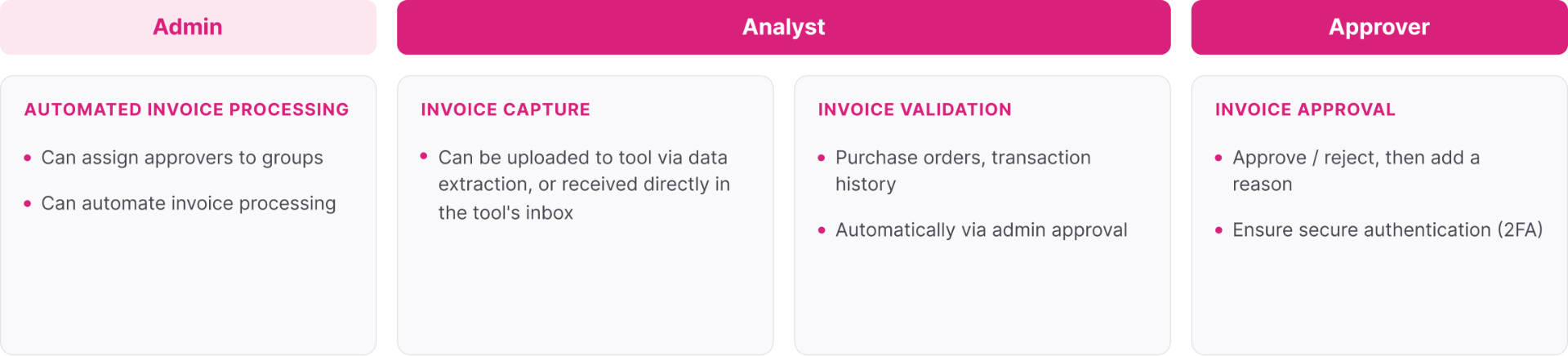
I identified three personas to design for: admin, approver, and analyst. Each were responsible for a distinct part of the invoice processing flow, and together they covered the full lifecycle of the process from submission to final approval.
Choosing what to implement
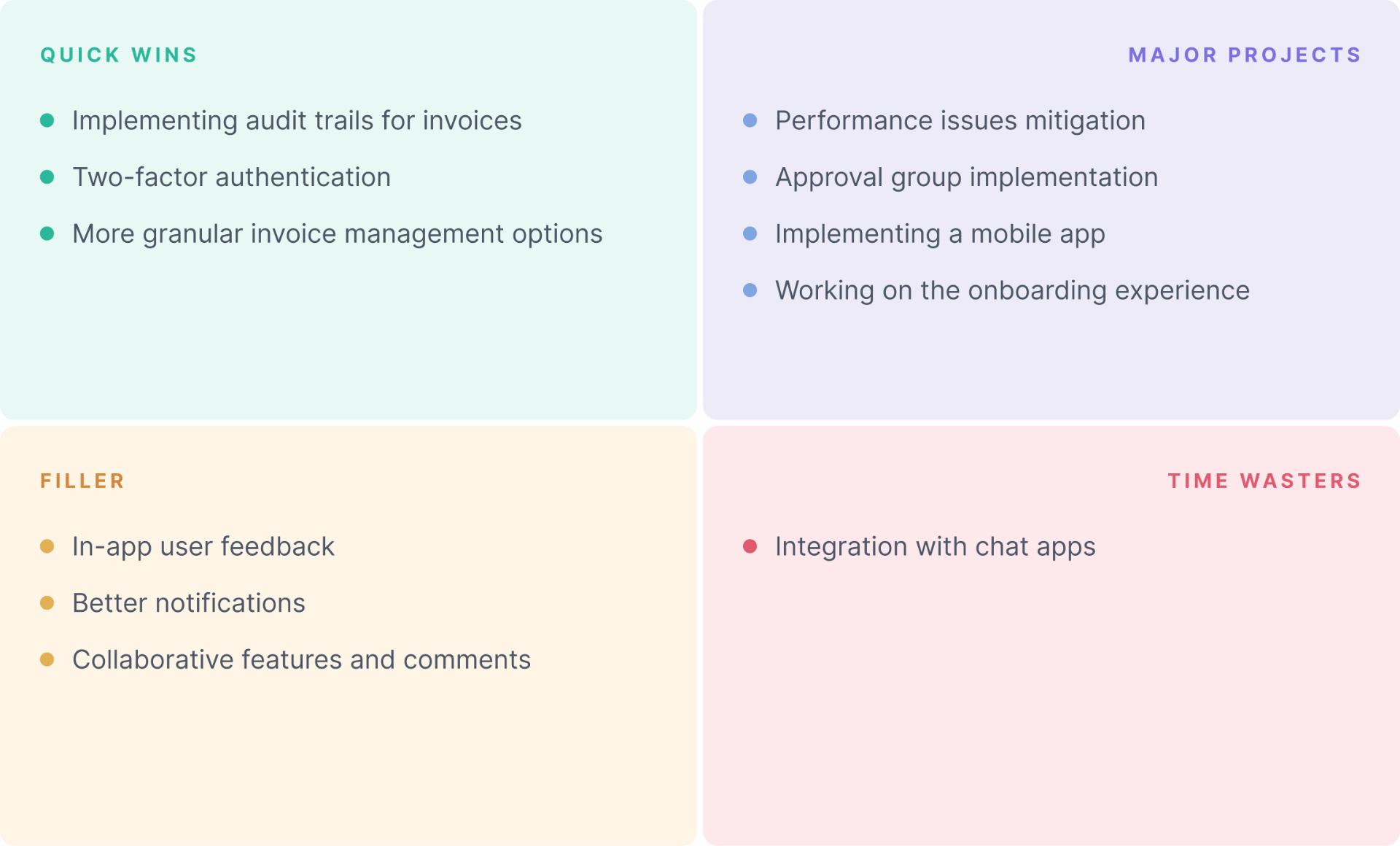
I couldn't cover every base, so I thought strategically. Using a Value-Effort Matrix, I separated features by impact, seeing which would deliver value quickly and which weren't worth the effort.
02 // Screens
Invoice validation
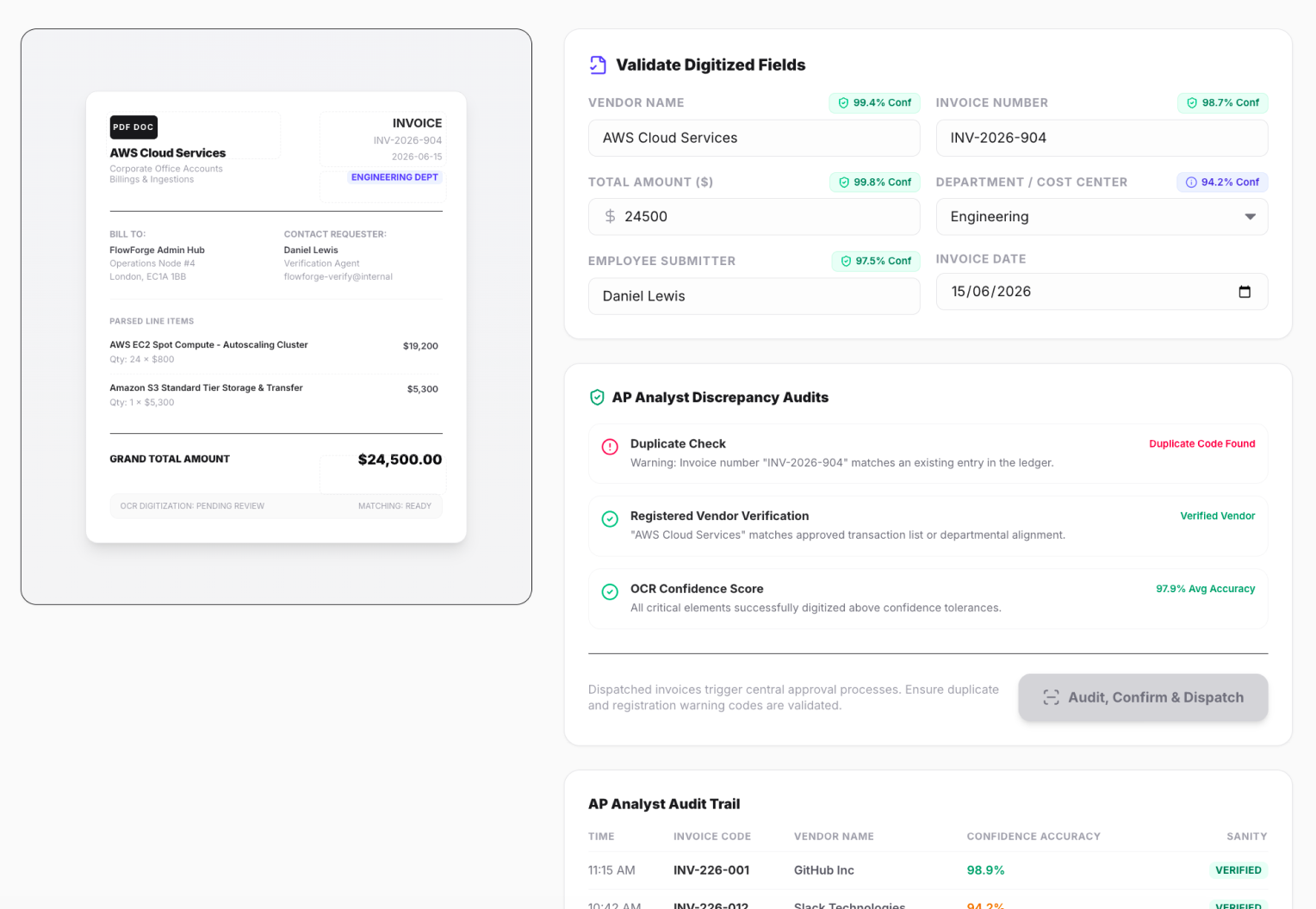
The AP analyst engages directly with the invoice to validate it properly. The focus with this page was on presenting information clearly to prevent user mistakes.
Invoice automation
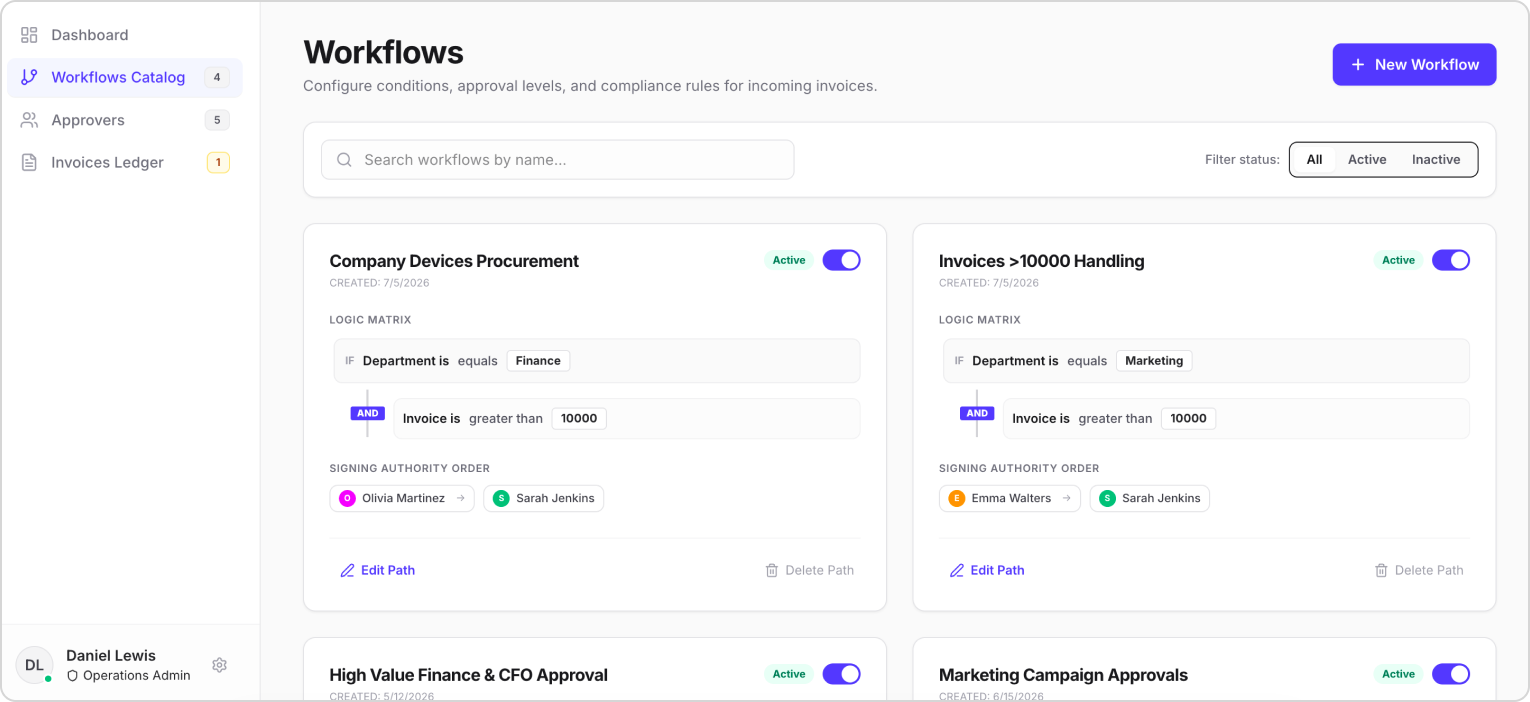
Invoice automation kept people from drowning in backlog and cut the overall workload. I also added support for custom approval groups based on company hierarchy.
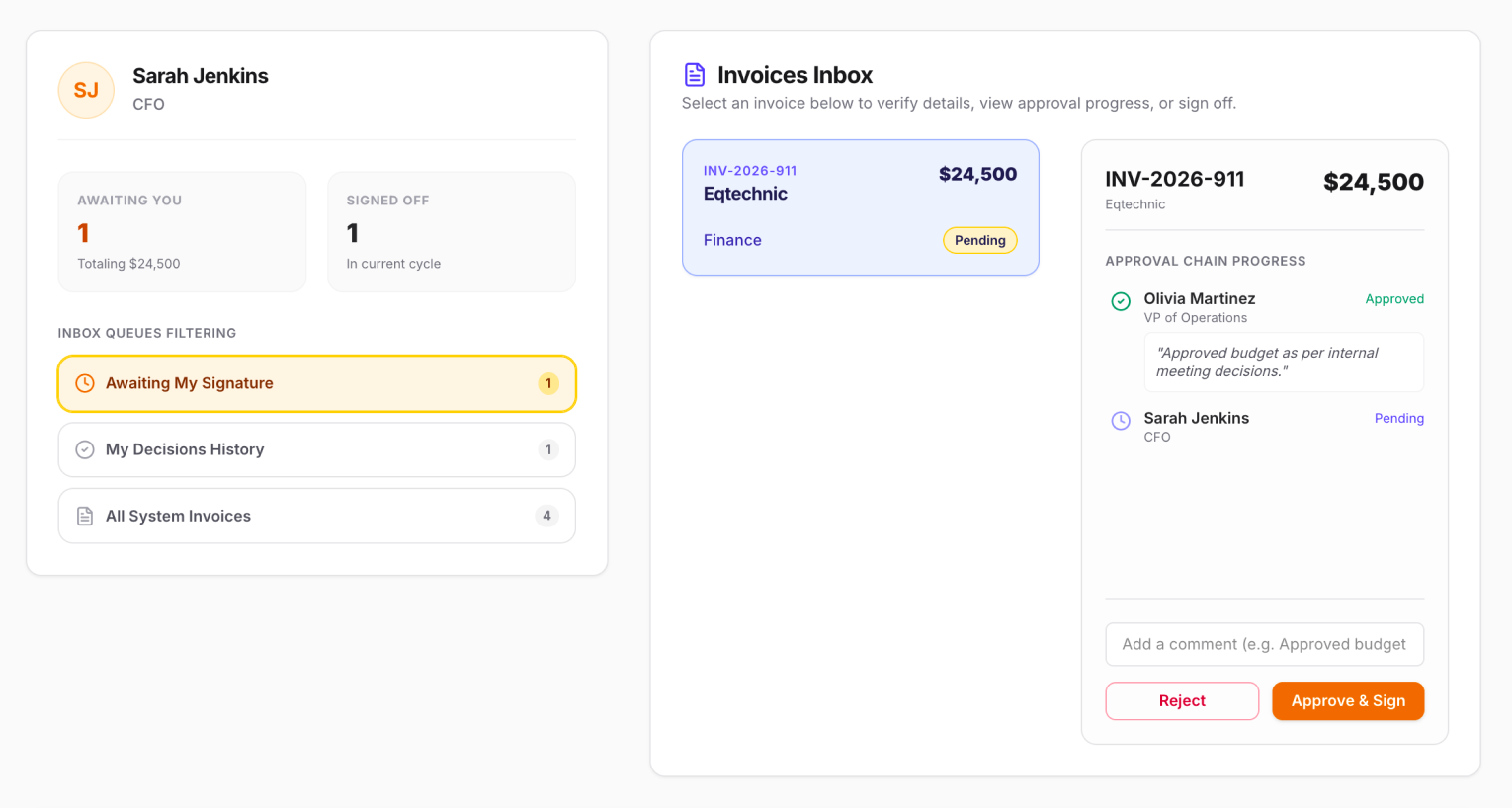
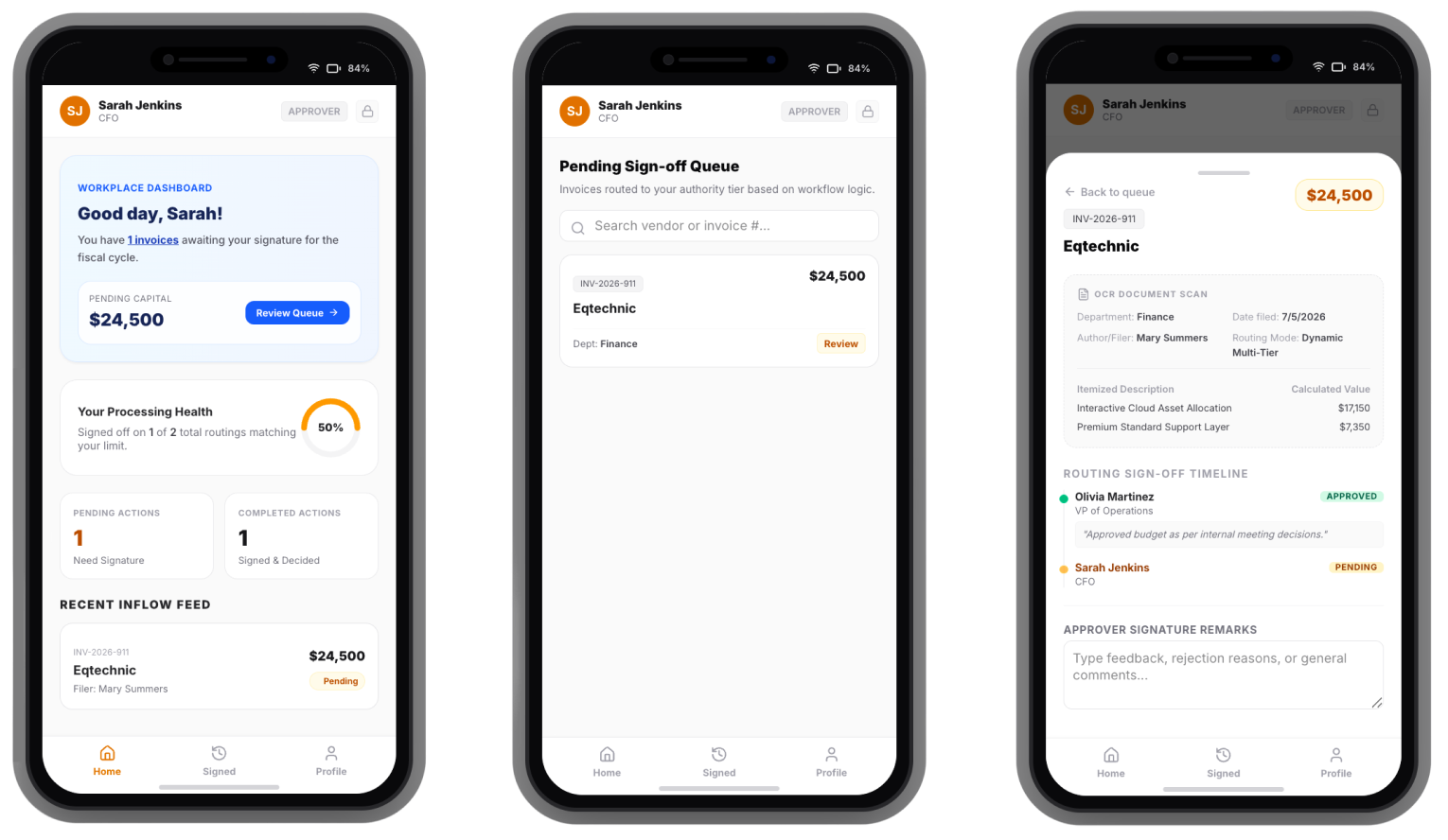
Invoice approval
The approver persona carried the most responsibility in the processing flow, and the interface had to reflect that, including the ability to handle invoices on the go via a mobile app.
03 // KEY TAKEAWAYS
Agentic AI and its perks
Integrating Figma AI and agent-based workflows significantly improved my efficiency. Working directly on the canvas enabled me to iterate faster and reduce the friction in my design process. Contrary to earlier preconceived notions I had that Figma AI was limited or inefficient, I found it to be highly capable in practice.
AI is making designers move faster, turning what used to take days of manual iteration into hours of rapid exploration. It hasn't replaced design thinking for me, but it's quickly removing the friction between idea and execution.
Conclusion
Sennder tackled a real problem: AP teams drowning in manual work as invoice volume outpaces their process. By leveraging market research and user interviews, I designed for actual user pain points instead of assumptions. In one week and by using AI, I built a functional MVP that automated the invoice pipeline and gave approvers a mobile flow to handle decisions on the go.